New Storage VPS Lineup
Best SSD Storage VPS
for Less
Get a lot of storage at the best value on the entire market. Our VPS for storage can be used for any application or project, and it’s a great fit if you
prefer VM for your storage needs.
Storage VPS 10
$
3
96
/ month
for a 12-month term
2 vCPU Cores
4 GB RAM
300 GB SSD
200 Mbit/s Port
Unlimited Traffic*
Storage VPS 20
$
6
36
/ month
for a 12-month term
3 vCPU Cores
8 GB RAM
400 GB SSD
300 Mbit/s Port
Unlimited Traffic*
Storage VPS 30
$
12
00
/ month
for a 12-month term
6 vCPU Cores
18 GB RAM
1 TB SSD
600 Mbit/s Port
Unlimited Traffic*
Storage VPS 40
$
20
80
/ month
for a 12-month term
8 vCPU Cores
30 GB RAM
1.2 TB SSD
800 Mbit/s Port
Unlimited Traffic*
Storage VPS 50
$
36
80
/ month
for a 12-month term
14 vCPU Cores
50 GB RAM
1.4 TB SSD
1 Gbit/s Port
Unlimited Traffic*
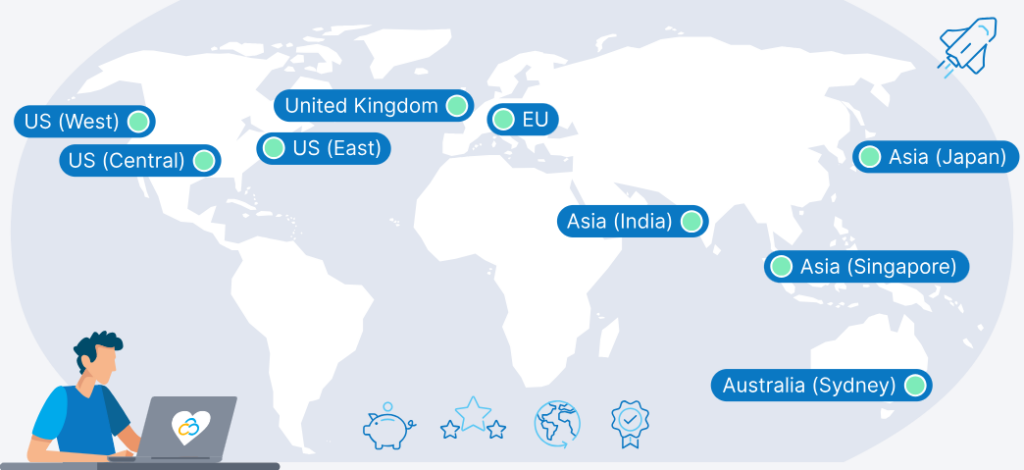
9 Regions, 11 Locations, Global Availability
From the USA to the UK, from Europe to Asia and Australia, choose your ideal hosting location for low latency worldwide
What You Get with Your Cloud VDS Server
Lots of SSD Storage
Get lots of fast SSD storage for cheap (up to 1.4 TB), and you get full control and on-demand access to your data.
Networking Possibilities
Dedicated IPv4 and IPv6 addresses, with options to configure additional IPs. Create virtual private networks with unlimited internal traffic.
API & CLI
Automate your cloud management with custom images, cloud-init, SSH keys, and CI/CD pipelines, using our API or CLI.
Unlimited Traffic
Unlimited outgoing and unlimited inbound data transfer with 200 Mbit/s to 1 Gbit/s speeds. Fair usage policies apply.
Exclusive IP Addresses
Each server comes with unique IPv4 and IPv6 addresses. You can also configure extra IPs to scale with your growing network demands.
DNS and Domain Flexibility
Manage DNS settings easily through our control panel, with options for domain purchasing or transferring, facilitating seamless integration.
Provisioning in Minutes
Always-On DDoS Protection
Our infrastructure is equipped with always-on DDoS protection, safeguarding your digital assets against attacks and ensuring uninterrupted operations.
DevOps Features
Enhance your deployment process with custom images, cloud-init, SSH keys, and CI/CD pipelines, designed for quick and efficient development operations.
See Why Customers Love Contabo
Most Popular Use Cases
Storage-Intense Applications
Storage VPS is well-suited for applications that don’t have high I/O requirements and need to read/write a lot of data while performing computations, e.g., self-hosting Nextcloud (our customers have found this tutorial on setting up Nextcloud on any VPS to be helpful).
Backups and Disaster Recovery
Our customers typically use Storage VPS for backups, archiving data, and disaster recovery. Some also use Object Storage for additional backups of their data (you can never have too many backups of your backups).
Store Your Data with Full Control and Quick Access
You can use Storage VPS as a block storage alternative if you prefer a VM with a lot of storage data and want full control and quick access to your data.
The Contabo Difference
Top Performance at Fair Prices
Why pay more? We get the best deals on the latest tech from industry giants like AMD and Samsung to deliver state-of-the-art servers that fit any budget.
Security is Our Priority
We protect your data like it’s our own with DDoS protection and strict internal procedures. As our co-founder puts it, “we are obsessed with security.”
Global Availability
Get the most out of your server wherever you are. Twelve strategic Locations in nine global regions ensure low latency and SLA-backed reliability.
Quality That Delivers
Over 20 years strong and always improving, we’re committed to cloud hosting that maximizes your value without compromising on quality.
Support That Never Sleeps
Round-the-clock, award-winning, English-speaking support that’s just a call or click away – plus live chat, self-help resources, and tutorial videos.
Awards and Recognitions
There’s a reason many of our awards say “Top Choice”. Our ratings for superior speed, helpful customer service, and great value speak for themselves.
Operating Systems, Apps, and Deployment Options for Your Storage VPS


Storage VPS 10
$
3
96
/ month
for a 12-month term
2 vCPU Cores
4 GB RAM
300 GB SSD
200 Mbit/s Port
Unlimited Traffic*
Storage VPS 20
$
6
36
/ month
for a 12-month term
3 vCPU Cores
8 GB RAM
400 GB SSD
300 Mbit/s Port
Unlimited Traffic*
Storage VPS 30
$
12
00
/ month
for a 12-month term
6 vCPU Cores
18 GB RAM
1 TB SSD
600 Mbit/s Port
Unlimited Traffic*
Storage VPS 40
$
20
80
/ month
for a 12-month term
8 vCPU Cores
30 GB RAM
1.2 TB SSD
800 Mbit/s Port
Unlimited Traffic*
Storage VPS 50
$
36
80
/ month
for a 12-month term
14 vCPU Cores
50 GB RAM
1.4 TB SSD
1 Gbit/s Port
Unlimited Traffic*
The price displayed is the effective monthly rate for a 12-month subscription including applicable taxes.
Minimum initial contract length: 1 month | Minimum following contract length: Equal to the initial contract length | Minimum cancellation notice: None (pre-paid) or 4 weeks (post-paid).
The price displayed is the effective monthly rate for a 12-month subscription including applicable taxes.
Incoming Traffic: unlimited and unmetered. No extra charges apply. | Outgoing Traffic: Unlimited – fair usage policy applies based on average server workloads. To maintain fair network performance for all customers, Contabo reserves the right to throttle servers with exceptionally high or disruptive usage patterns.
Storage VPS FAQs
Frequently Asked Questions for our Storage VPS
Our Virtual Private Servers do not support nested virtualization. However, our powerful Dedicated Servers and cost-effective Virtual Dedicated Servers do allow you to set up and run your own virtual machines.
You can use Storage VPS for any purpose. Our customers use Storage VPS for a variety of applications ranging from file hosting to disaster recovery.
Here are some of the most common use cases:
- Self-hosting apps like Nextcloud.
- Backups for everything ranging from websites to family photos.
- Archiving data.
- Storage-intense applications.
- Disaster recovery.
And check out this comparison guide if you’re considering object storage.
Each Storage VPS plan is pre-configured to give you the most bang for your buck, so you’re not able to customize or change the hardware specs of your plan. But, you can upgrade to a better configuration or increase storage as recommended in your plan.
We also recommend exploring our cloud virtual dedicated servers (Cloud VDS) or checking out our brawny dedicated servers if you want end-to-end customization.
Yes, you can upgrade to a more powerful VPS plan through the Customer Control Panel. Simply navigate to your VPS instances via the sidebar, then click “More” on the VPS you wish to upgrade and select “Upgrade” from the dropdown menu.
If you want to downgrade, then you’ll need to buy the smaller plan through the Customer Control Panel. Once you downgrade, we recommend transferring all the data from your current VPS to the new one, and then mark your old VPS for cancellation. You’re always welcome to contact support if you need help with this.
We firmly believe in offering as many choices as possible to our customers, so we support many operating systems as preinstalled Add-Ons for your VPS. You can choose from popular Linux distributions such as Ubuntu, RHEL Variants, Debian, AlmaLinux, and Rocky Linux.
We also offer Windows Server for those who prefer this OS. If you choose this option, please note that the Windows license fee is added to your monthly VPS fee.
Of course, you’re not only limited to these operating systems. With full root access, you can easily install the OS of your choice.
Yes, we offer cPanel and Plesk hosting control panels at additional cost. We also offer Webmin for free. Note that we’re offering Plesk for free for the first month across our Cloud VPS, Cloud VDS, Storage VPS, and Dedicated Server plans.
If you’re not satisfied with Plesk within the first month, then just cancel it before the end of your first month through the Customer Control Panel (you won’t be charged if you cancel it before the first month ends). We also put together this hosting panel comparison guide to help you decide which panel is best for your needs.
Check out our Knowledge Base for everything you need to know on getting your server up and running, from accessing the Contabo Customer Control Panel to configuring additional IP addresses.
If you’re looking for even more learning material, then you should check out our full list of tutorials or our video guides.