Cloud VPS and Bare Metal Servers for Less

Cloud VPS and Bare Metal Servers for Less

Help

Login

Sign Up

n8n

n8n VPS

Self-hosted n8n: Save Hours of Work with AI & Automated Workflows

Free Pre-Installed n8n

Unlimited Workflows

Full Data Control

Our customers say

Excellent

4.4 out of 5 based on 8,396 reviews

Build powerful no-code AI workflows to automate your tasks on your own private server. Choose a high-performance Cloud VPS with n8n pre-installed, free of charge, and ready to go in minutes.

Cloud VPS 10

n8n
Simple Tasks

$4.95

$

3

96

/ month

for a 12-month term

Great for personal reminders, social media posting, and data backups.

4 vCPU Cores
8 GB RAM
75 GB NVMe
Auto Backup available

Cloud VPS 20

n8n
Basic Workloads

$7.95

$

6

36

/ month

for a 12-month term

Ideal for web scraping,    social media reporting, and data analytics.

6 vCPU Cores
12 GB RAM
100 GB NVMe
Auto Backup available

Cloud VPS 40

n8n
Small Business Needs

$26.00

$

20

80

/ month

for a 12-month term

Perfect for syncing CRM  data, processing orders, and marketing automation.

12 vCPU Cores
48 GB RAM
250 GB NVMe
Auto Backup available

Cloud VPS 60

n8n
Complex Workflows

$59.00

$

47

20

/ month

for a 12-month term

Maximum power for complex systems and data-intensive automations.

18 vCPU Cores
96 GB RAM
350 GB NVMe
Auto Backup available

What is n8n?

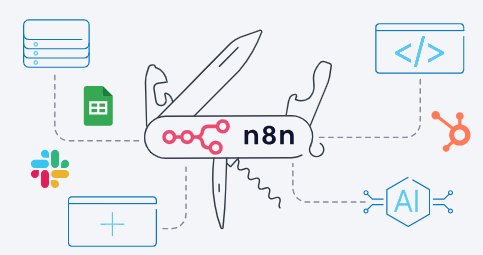
Your Swiss Army Knife for Multi-Step Automations

Think of n8n as a powerful toolkit that connects different apps and services to handle repetitive tasks for you. It uses a simple, visual drag-and-drop editor where you link together nodes to create a workflow. Each node is a step in your process.

n8n is an open-source workflow automation tool that’s built for flexibility. You can write your own custom code, connect to internal databases, integrate AI agents, or use an HTTP node to talk to virtually any service with an API.

What Will You Automate?

Self-hosting open-source n8n opens up a world of possibilities. Because you have full control and unlimited executions, you can automate simple tasks and complex systems alike.

Developers

Connect to private APIs and databases, run custom code, and automate your CI/CD pipeline.

Marketers & Agencies

Schedule and publish content, build powerful lead nurturing flows, and consolidate client reports.

Small & Medium Businesses

Automate lead management, sync sales and inventory data, and trigger personalized onboarding flows.

IT & Operations Teams

Monitor system and website health, automate account creation, and assign helpdesk tickets automatically.

Start Automating In Minutes

Wondering how to self-host n8n? Forget complicated command-line installations that take hours. With Contabo, you get n8n already installed on a VPS of your choice.

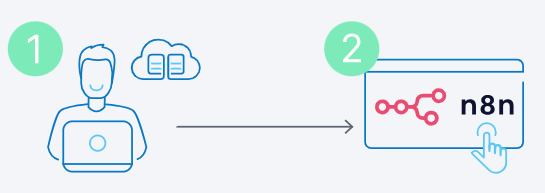
Step 1: Choose Your Plan

Pick the n8n plan with the right resources for your automation needs (see our recommendations above or choose your own server).

Step 2: Start Automating

Once we’ve set up your server including n8n, it’s over to you! Start connecting nodes and create your first workflow.

Why Self-Host n8n on the Contabo Cloud?

Self-hosting n8n on your own VPS gives you a level of freedom, power, and control that the n8n Cloud or alternative workflow automation platforms like Zapier or Make simply can’t offer.

Pay one flat monthly fee for your server – that’s it.

Fast, reliable performance with allocated resources.

Unlimited workflows – no extra costs – queue mode included.

Integrate anything: internal databases, APIs, and more.

Total flexibility to customize code, nodes, and connections.

Fast, reliable performance with allocated resources.

What Can You Connect with n8n?

n8n lets you connect hundreds of third-party apps and services via existing nodes or your own custom code. Imagine what’s possible with just a few of the most popular integrations below.

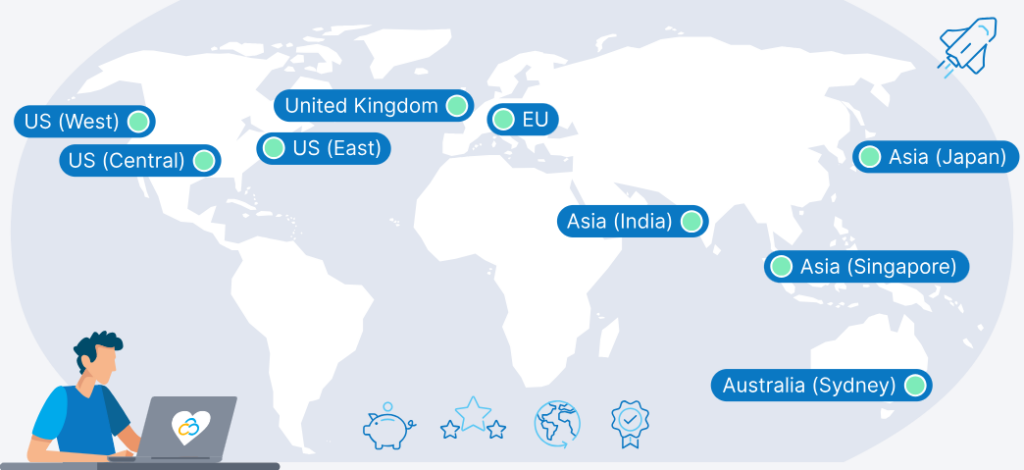
9 Regions, 11 Locations, Global Availability

Host your n8n system at a Contabo Data Center near you to ensure low-latency performant access, redundancy, as well as compliance and data residency.

Trusted by Thousands Worldwide

190

Countries Served

225,000+

Customers Worldwide

450,000

Servers Running

22 Years

In Business

Frequently Asked Questions about n8n Hosting

FAQs | More information on n8n Hosting on Contabo

Once your server is deployed, you access n8n’s visual workflow editor via your hostname IP address. From there, you can start building automations by connecting different application nodes. For a step-by-step walkthrough, check out our article: The Complete Beginner’s Guide to n8n: Your First Workflow.

An n8n AI Agent refers to a workflow that uses n8n’s built-in AI capabilities to perform complex tasks. You can connect to large language models (like GPT-4), feed them data from your other nodes, and use the AI’s output to make decisions within your automation. To see how it’s done, explore our post: n8n AI Workflows: Advanced Integrations & Use Cases

The biggest differences are in cost, control, and customization. Self-hosted n8n offers unlimited executions for a flat fee and complete data privacy, whereas Zapier and Make use a pay-per-task model on their cloud platforms. n8n also provides much deeper flexibility for developers. For a detailed breakdown, read our guide: n8n vs. Zapier vs. Make: An In-Depth Comparison.

n8n is an open-source, highly customizable platform that allows developers to write custom logic in JavaScript or Python, build their own nodes, and connect to private APIs or internal services. It offers the perfect balance, combining a time-saving visual editor with the power of real code and limitless integration possibilities.

For a classic use case with endless possibilities, see our blog article: The Ultimate Guide to n8n Web Scraping

This is a classic and powerful use case. You would create a workflow with a trigger node for your CRM (e.g., “New Contact in HubSpot”). You then connect that to a “Google Sheets” node, mapping the contact’s data (like name, email, and company) to the correct columns in your sheet.

For more e-commerce related use cases, check out our article: n8n E-commerce Automation: How to Scale Your Business

The Cloud n8n version is fully managed (instant setup, updates, scaling) but costs more and offers less customization; the self-hosted version gives full control, data sovereignty, and lower long‑term cost but requires server admin skills and maintenance. With the 1-click add-on from Contabo, the self-hosted version offers low monthly cost, full control, ideal for high‑volume automations, without any DevOps skills being necessary.
While our 1-click Add-On is the fastest method, running n8n with Docker on a Contabo VPS offers even more configuration control. The official n8n documentation provides a undefined file that makes setup straightforward. For detailed instructions, see our article: Self-Hosting n8n: A Comprehensive Docker & VPS Guide.

You can absolutely run n8n on a local Windows machine for development and testing. However, for a stable, always-on production environment, we recommend our 1-Click Add-on for a Linux VPS. For instructions on installing n8n on Windows, the official n8n documentation is the best resource.

You can easily install n8n free of charge on any existing Contabo VPS or VDS instance via your Customer Control Panel. Simply follow our step-by-step guide.

Of course. You can do this easily via the Users section within the n8n Settings menu.

Please note that due to server-side restrictions, invited users will not receive an email. However, you can simply copy the invite link and send it to the users you wish to add. They can use this link to connect to your n8n instance as normal.

The entire provisioning process including installation of the n8n image can take up to 30 minutes in two stages:

  1. Your server will be provisioned, and you will receive login details via email. For standard configurations, this usually takes no more than a few minutes.

  2. Once the server itself is up and running, please allow the remainder of 30 minutes for the n8n instance to be installed and activated.

We provide full technical support for the Contabo VPS itself – including the network, hardware, and initial setup of the 1-click Add-On. For specific questions about building workflows or troubleshooting n8n’s features, the extensive n8n documentation and their active community forum are the best resources.

The price displayed is the effective monthly rate for a 12-month subscription including applicable taxes.

Minimum initial contract length: 1 month | Minimum following contract length: Equal to the initial contract length | Minimum cancellation notice: None (pre-paid) or 4 weeks (post-paid).

Incoming Traffic: Unlimited and unmetered. No extra charges apply. | Outgoing Traffic: Unlimited – fair usage policy applies based on average server workloads. To maintain fair network performance for all customers, Contabo reserves the right to throttle servers with exceptionally high or disruptive usage patterns.

Applications and Add-Ons: Contabo provides full technical assistance for the Contabo VPS itself – including the network, hardware, and initial setup of any 1-click Add-Ons. Any additional open source software included in the applications is owned by the respective provider – maintenance, upgrading, and troubleshooting are within the end-users responsibility.

Contabo is not responsible for the licenses of the software included in the image. They are managed by the respective provider.

n8n Hosting Guides

Quick, practical blog guides to help you get the most from your n8n server

blog-ref_240x125_guide-n8n-beginner_EN

Learn n8n from scratch and build your first real workflow step by step, from core concepts to a working example.
Start with The Complete Beginner’s Guide to n8n: Your First Workflow

blog-ref_240x125_n8n-vs-zapier-vs-make

Find out what matters when it comes to automation platforms. We help you pick the perfect tool for you.
Get the full breakdown in n8n vs. Zapier vs. Make

blog-ref_240x125_guide-self-hosting-n8n_EN

Run n8n on your own VPS using Docker, including setup, configuration, and data persistence on Contabo.
Follow the steps in Self-Hosting n8n: A Comprehensive Docker & VPS Guide

Scroll to Top